From shelf to parcel. No wrong picks.
PackScan and Inventory are two web apps for iPhone and Android that work directly with your Dolibarr: pick list sorted by storage location, packing by label scan, stocktaking in seconds per item. No app store, no cloud, no new software on the server. The apps are open source. If you want help with the setup, book the setup package.
Every item has a storage location like 2.LW1.3.12. The apps show you where it hangs and sort the pick list in walking order.
From my own warehouse
I have been running an online shop since 2014, together with my son since 2019, and have worked with Dolibarr since version 9.0.2. Over that time I gained a lot of experience with warehousing and shipping and kept improving the processes. The result is two apps that run in my warehouse every day and can make your work much easier too.
Stefan Grumpelt, gRoods.de
Where shipping loses time and money
Each of these mistakes costs postage, a return or a bad review. The apps check every step with the barcode instead of relying on lists and memory.
Similar variants, sizes, colours. Every item is scanned when packing, wrong ones trigger an alarm immediately.
The system says 1, the shelf is empty. With the shipping automation, labels and Internetmarke stamps are only created for orders that were actually picked.
Where is the black watch strap in size M? Pick list sorted by storage location, with a grid of the wall.
An aborted shipping run, a second start. The shipping automation books and labels every order only once, even after an abort. How this is safeguarded
Usually only one piece of an item is sold. When an order does say 2 or 3, it is easily overlooked. The result is free follow-up shipments. Every piece is scanned individually. Only when all of them are in the parcel is the line done.
From marketplace to shipped parcel
This is a shipping day at gRoods.de. Every step can be traced in Dolibarr, and at the end every order has a shipment, a tracking number and a status.
In the apps is part of the free package. Add-on needs its own integration, e.g. a marketplace import or the shipping automation.
- Record storage locations and stockInventory
The foundation for everything else: PackScan can only sort and check if storage locations and stock are right. With the inventory app you walk through the warehouse once, assign storage locations and correct the stock. After that you recount on the side, e.g. with an exported count sheet.
- Import ordersAdd-on: import
Orders from eBay, WooCommerce and other marketplaces arrive in Dolibarr as sales orders with an invoice. The stock is reserved in the picking warehouse.
- Work through the pick listPackScan
PackScan combines all open orders into one list, sorted by storage location. Every grab from the shelf is scanned. For ten identical items you simply type the quantity.
- Release picked ordersPackScan
The app allocates the collected goods to the orders, oldest first. Only orders whose items are all there are released.
- Start the shipping runAdd-on: automation
DHL labels or Internetmarke stamps are created for the released orders. Stock is transferred once, tracking number and customer email go out, and the number is reported to the marketplace. Without the automation you create the label in your shipping tool and the shipment in Dolibarr yourself.
- Packing by label scanPackScan
Scan the label or Internetmarke and the matching shipment opens. Every item is scanned before it goes into the envelope.
- Close automaticallyPackScan
After the last item the app validates the shipment and closes the order in Dolibarr. Then comes the next label.
Two apps, one workflow
Both run in the smartphone browser and sit as an icon on the home screen. The barcode scanner is built in and reads EAN, Code 128, QR and the matrix code of the Internetmarke.
Count first, then pick
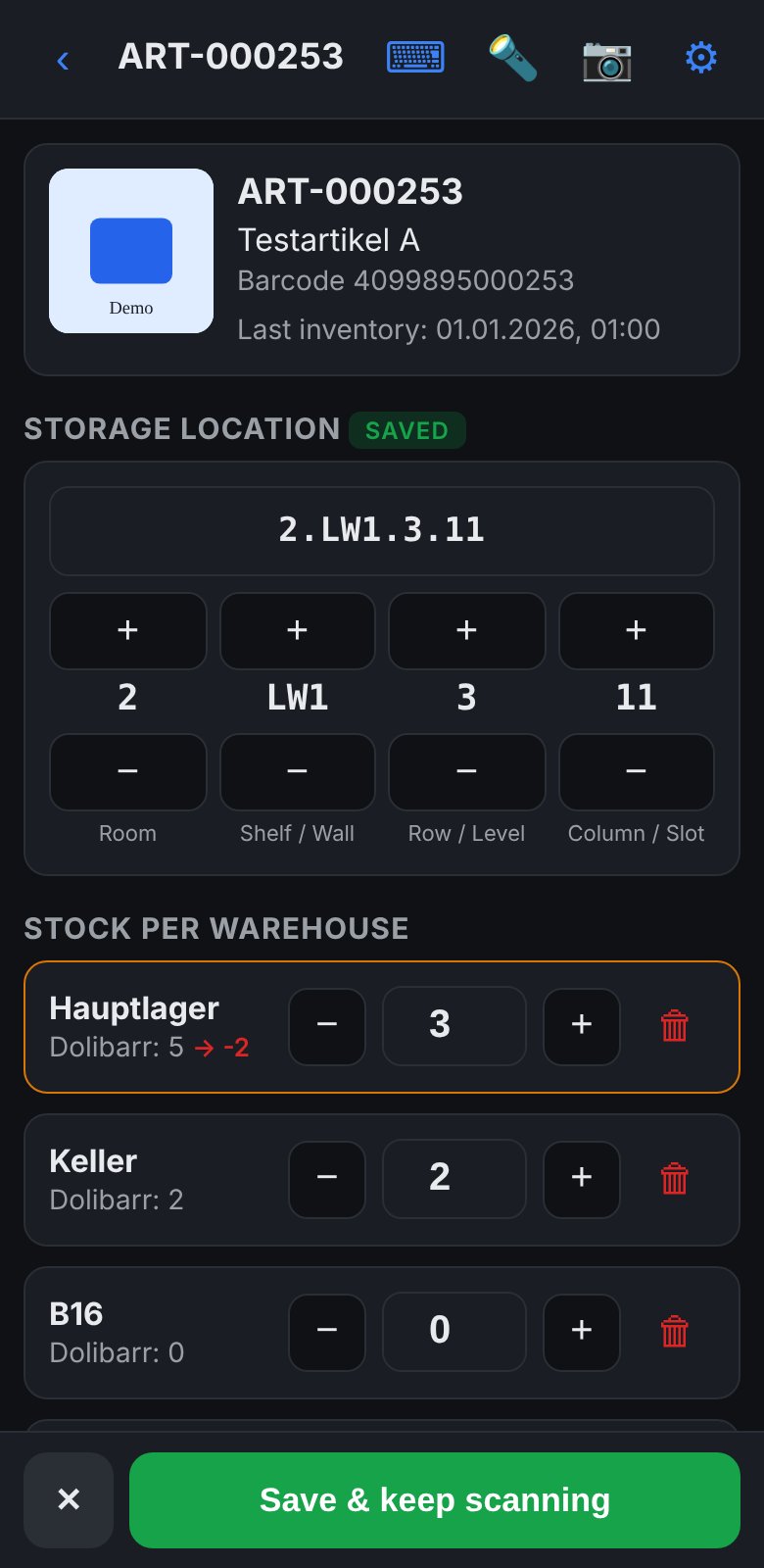
Stocktaking is the foundation for PackScan: storage locations and stock must be right before the pick list sorts by them. Scan the item, check location and quantity, save. The camera is ready again immediately.
- Finds products by barcode or a separate GTIN field.
- Suggests the next storage location for new items when you go shelf by shelf from left to right.
- Stock per warehouse with −, + and delete to 0. If the count differs, the app shows the difference to Dolibarr right away, e.g. “→ −2”. “Save” books it immediately as a stock movement with code
INVand date. The stock is reloaded fresh from Dolibarr right before. - Nothing is booked until you save. An accidental scan only shows the item.
- Saves date and time of the last count and warns if an item has already been counted today.
- Flashlight for dark corners, warehouses freely selectable and sortable.
New: count sheet and inventory log as PDF or CSV. The count sheet lists all items sorted by storage location, with expected stock per warehouse, a field for the counted quantity and the date of the last count. You can filter by storage location, e.g. a single wall, and by items not counted since a cut-off date. The inventory log lists all booked corrections for a period. Items with batch or serial number: storage location yes, please correct stock in Dolibarr.
Pick list by storage location
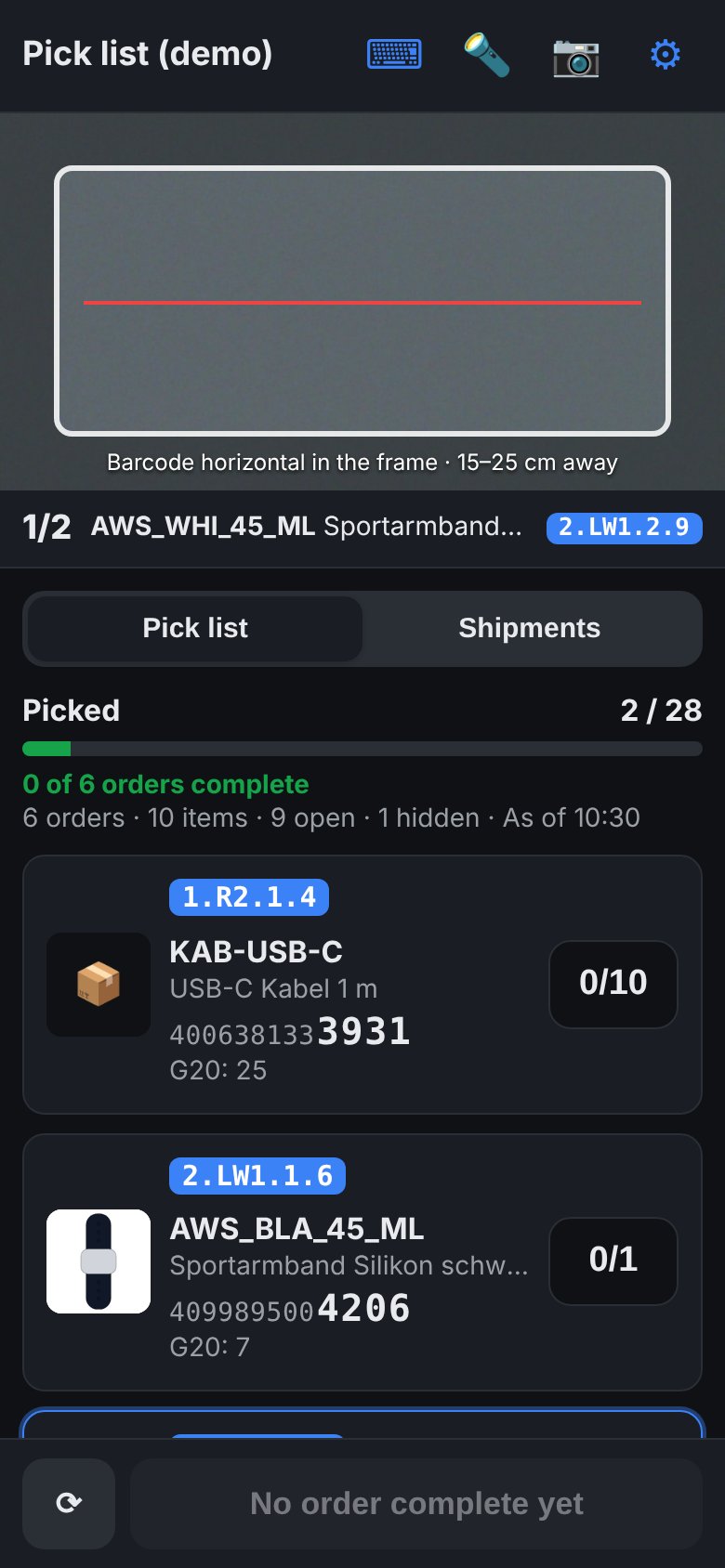
All open orders in one list, sorted by your walking route through the warehouse.
- Sorted by storage location: room, then wall or shelf, then row and column. You walk along the wall once instead of back and forth.
- Identical items from several orders are combined.
- Product image, storage location and the last EAN digits in large type, so you can grab without reading glasses.
- Stock per warehouse at a glance, items without stock at the very bottom.
- You hide shipping products such as postage lines once.
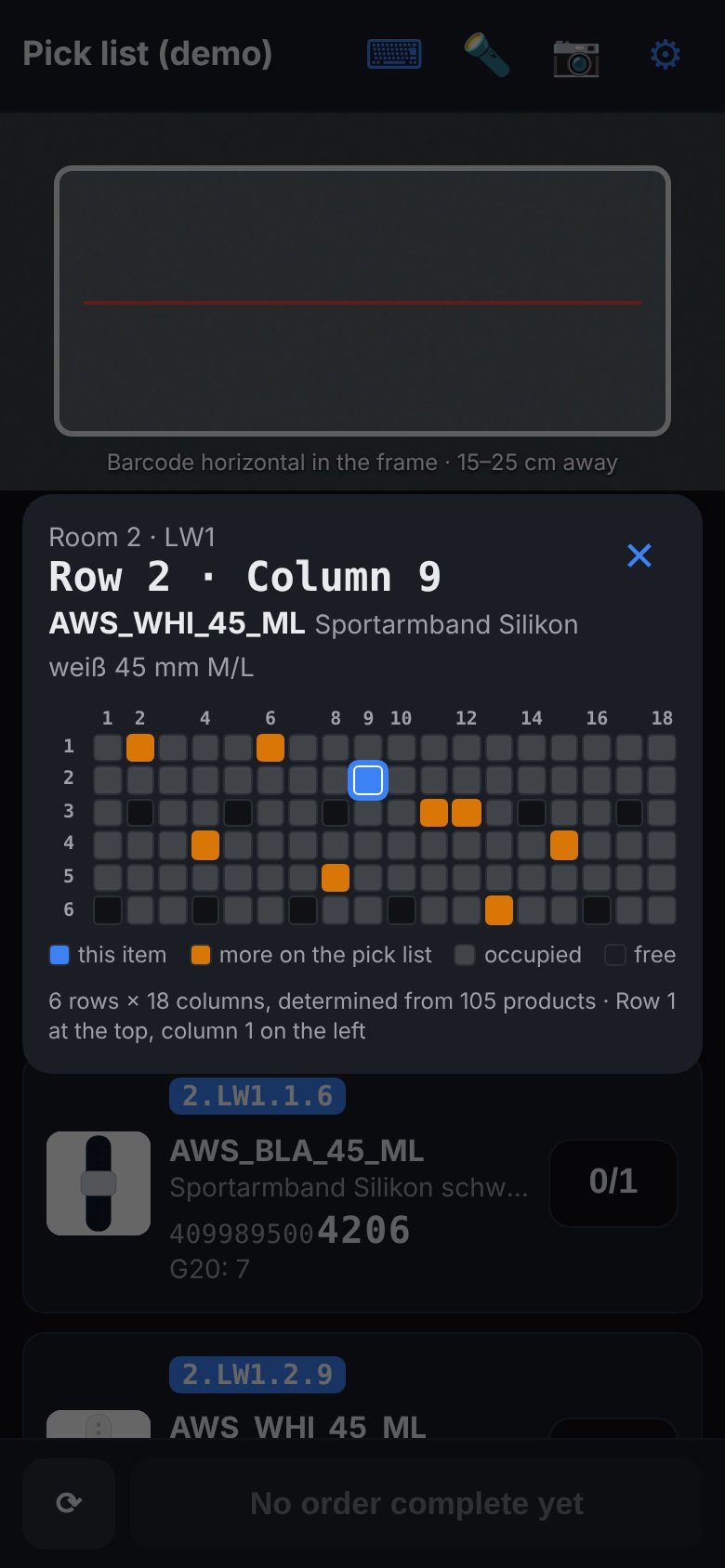
One tap on the location shows the wall
On a full pegboard with more than a hundred watch straps you find the right hook instantly. The app knows the size of every wall from your product data and draws it as a grid.
- Blue is the location you are looking for, orange all other items on the pick list at the same wall. Take them along right away.
- Grey occupied, dark free slots. You see free hooks for new goods on the side.
- Row 1 at the top or bottom, depending on how you count.
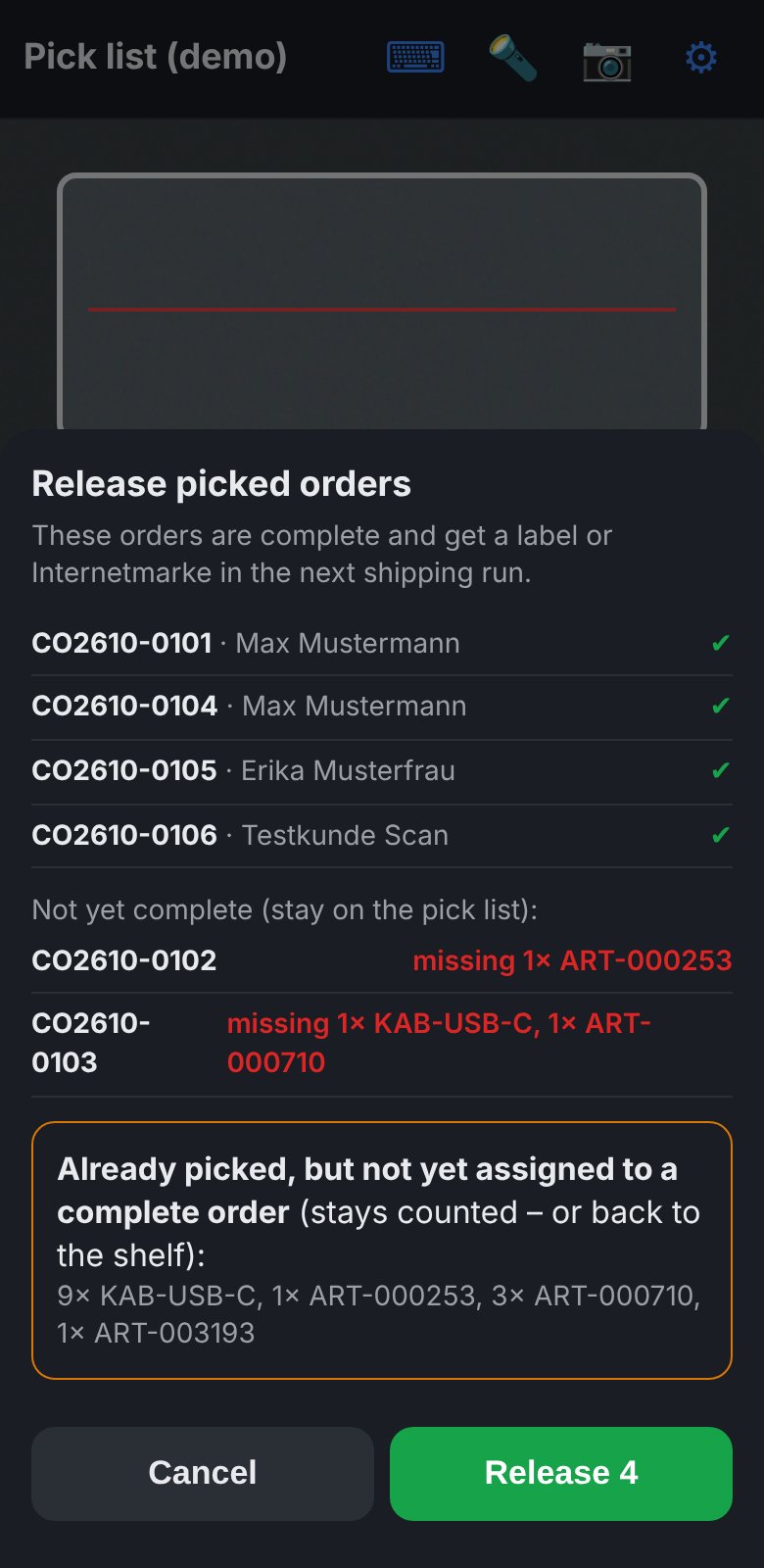
Only pay postage for what is really there
After picking you release the complete orders. Only then is a label created.
- The oldest orders get the goods first.
- Incomplete orders wait and do not block the others.
- The app shows what is left over so it goes back on the shelf.
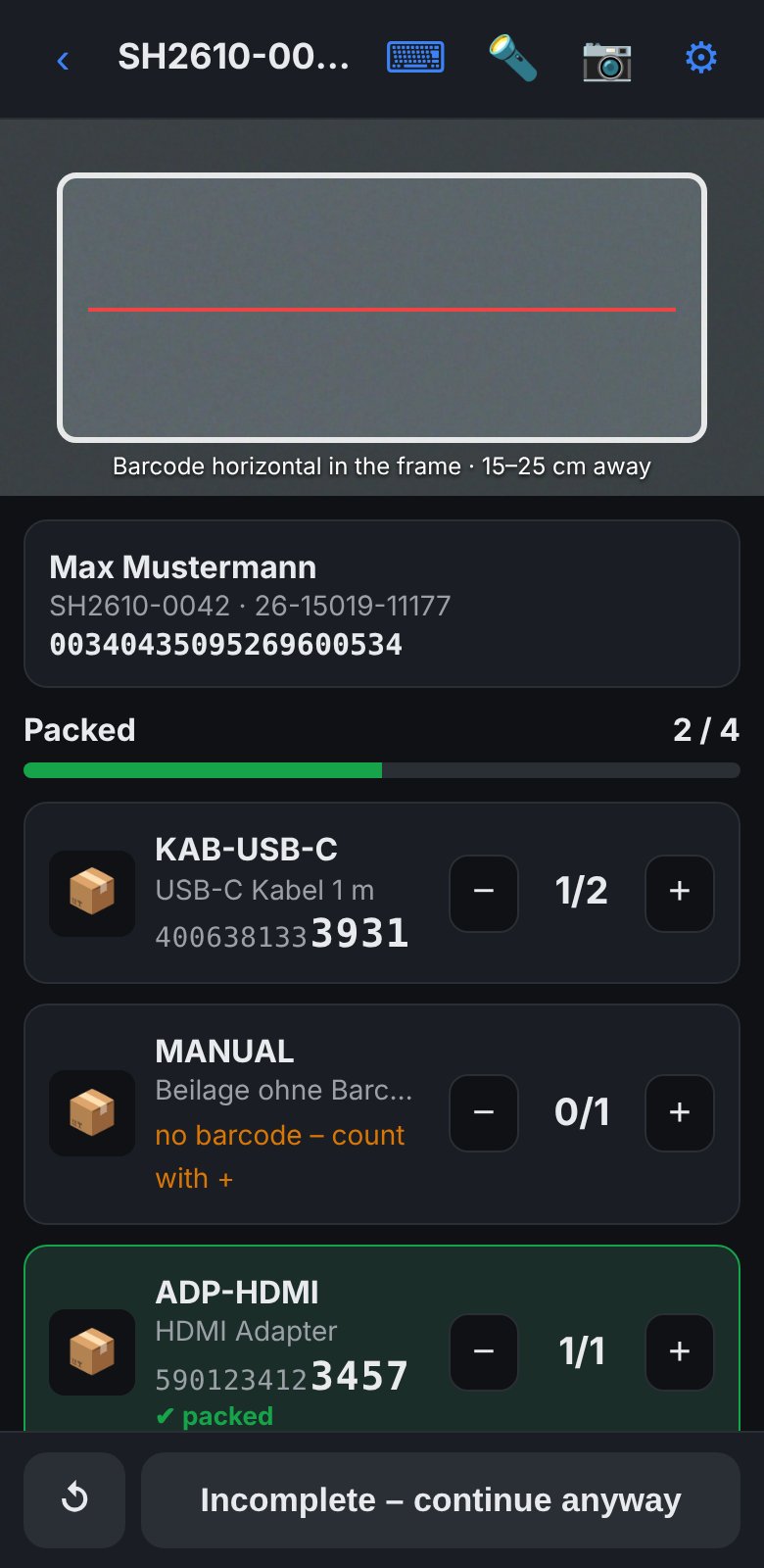
Scan label, scan items, done
Scanning the shipping label opens the right shipment, without searching or typing.
- Works with DHL labels and the matrix code of the Internetmarke.
- Right item: beep and green flash. Wrong item: warning tone and red message.
- Packed items slide to the bottom, open ones stay at the top.
- After the last item the app closes the shipment and the order in Dolibarr.
Try it now
Both apps run as a demo in the browser, without installation and without sign-up. Best open them on your smartphone, then you can test the scanner too.
Open PackScan demogroods.de/demo/packscan
Open Inventory demogroods.de/demo/inventur
Use the apps directlyno test data, with your Dolibarr
Download to self-hostPackScan-Inventur_v1.2.1.zip, 2 MB, GPL-3.0
Runs on iPhone in Safari (iOS 16 or later) and on Android in Chrome. Via “Add to Home Screen” or “Install app” it becomes an icon like a normal app.
- Start with test data
The demo opens with sample orders, a full pegboard and shipments to pack. Nothing goes to a real system.
- Enter your own Dolibarr
Gear icon top right, demo mode off, enter API URL and token, “Test connection”. Dolibarr sends the required permissions (CORS) out of the box. Depending on server configuration, proxy or security module, the connection from another address may still be blocked.
- Test with a read-only user
Create an API user for testing that may only read. You will see your real pick list and stock but cannot change anything. Which permissions these are is described in the Guide. The most reliable test is with the download in the
customfolder of your Dolibarr.
Built for warehouse work
A warehouse is not an office: little light, full hands, many similar items. These details make the difference.
One tap turns on the smartphone light. It stays on until you switch it off, even when switching between picking and packing. So the camera reads barcodes reliably behind shelves and under weak hall lighting.
Full HD camera image and the ZXing barcode engine that many native scanner apps use too. Reads EAN, Code 128, QR, DataMatrix.
Classic hand-scanner beep on recognition, a separate sound for “line complete”, a melody for “everything packed” and a gong when Dolibarr is closed. Errors sound low and flash red.
A barcode that stays in front of the camera counts only once. For the next piece you briefly move it out of view.
The final digits appear large next to every item, 4, 5 or 6 as you like. A tap on the product image shows it full screen.
The app reads the tracking number directly from the matrix code of the Internetmarke, just like the Post & DHL app.
Any scanner that acts as a keyboard works via the input line. For ten identical items you type the quantity.
Runs in Safari on iPhone and in Chrome on Android. As an icon on the home screen it starts full screen like a normal app. It speaks the browser language: German, English, French, Spanish and 20 more European languages.
Save and complete sit at the bottom within reach. After each step the view jumps back to the camera.
A code that describes the way
The storage location is stored as text on the product and is read like the way there: enter the room, go to the right wall or shelf, then choose row and column. The last two parts are always row and column.
Lots of digits in storage locations and EANs tire the eyes. That is why PackScan also shows the location graphically. And the EAN check whether you are holding the right product is luckily done by the scanner.
2.LW1.3.12Room 2, pegboard 1, row 3, column 122.SLW.E1.2.2.11Longer codes work too, e.g. a cabinet with levels. Row and column remain the last two parts.+1If an item has no location yet, the inventory app suggests the last assigned location plus one column.■ item you are looking for■ more on the pick list■ occupied□ free
What you save
Calculate with your own figures. The fields are filled with example values, not measurements. Set the hourly rate to what one hour of shipping work costs you.
Where the time comes from: no searching in the warehouse thanks to sorting by location, no ticking off on paper, no searching for the right shipment when packing, no closing at the PC. Mis-shipments and unnecessarily bought postage are not even included.
The apps are free. We do the setup together.
PackScan and Inventory are open source. For them to really work day to day, storage locations, barcodes and a few Dolibarr settings must be right. That is exactly where I help you.
Open Source
For everyone who wants to set up on their own.
- Complete and without restrictions: no limits on scans, employees or devices
- PackScan and Inventory as a download to self-host and on GitHub
- Setup guide with all requirements
- Online demo to try out, with test data or your Dolibarr
- Unpacked apps to use right away, without your own server
Support the project
The apps save you time and you set them up yourself? With a contribution you help to develop them further and adapt them to new Dolibarr versions. Every amount is welcome.
Setup packages
Net plus 19 % VAT. Via remote access and video call.
One existing Dolibarr installation: set up the app, API user and complementary attributes, function test, 30 minutes of training. 14 days of follow-up questions by email or WhatsApp, up to 30 minutes.
One installation, any number of smartphones. Agree the storage location scheme, check settings, test run with real orders and 60 minutes of training. 30 days of follow-up questions by email or WhatsApp, up to 1 hour.
DHL labels, Internetmarke, marketplace integration and individual processes. After a review of your accounts and processes.
After prior agreement, billed in quarter hours.
Support plans in the tiers Community, Basic, Business and Gold are also planned. They will come once the software has more users.
Custom setup package
For everything beyond the fixed prices. From the analysis to the first shipping day.
Warehouse and shipping
- Consulting on logistics and shipping processes: routes, packing station, shipping methods
- Talk about warehouse, items and shipping routes
- Storage location scheme for your walls and shelves
- Warehouse training via video call
- Shipping automation for DHL labels, Internetmarke and feedback to the marketplaces
Dolibarr and IT
- Prepare Dolibarr: complementary attributes, API user and permissions, shipping methods, stock settings
- Installation of the apps on your server, setup of the smartphones
- Automated processes via cron job, e.g. import and shipping run
- Backup of database and documents, with a restore test
- Dolibarr tuning: speed, modules, updates
- Security settings: HTTPS, users and permissions, access protection
Billed by effort at the hourly rate or as a fixed price agreed in advance.
Shipping automation: book once, label once
The automation is an add-on and not part of the free apps. At gRoods.de it runs daily as a Python script on the server. This is how it prevents double stock transfers and double labels, even if a run aborts or is started twice:
- Only one run at a time
The run locks a file on the server. If a second one starts while the first is still working, it aborts immediately without changing anything. The lock is released automatically when the process ends, even after a crash.
- Only released orders
Only orders with the field “picked” set, without a tracking number and without an existing shipment in Dolibarr are considered.
- Transfer per order, with a marker
Before every booking the run writes the reverse booking into a rollback file. All movements carry the code
VERSAND-plus order number, then the field “transferred” is set. Once the marker is set, it is never booked again. If it is missing, the run checks the existing movements: fully booked, then only the marker is added. Only partly booked, then the run holds this order and creates no label until you have checked. - Label only after a successful transfer
The tracking number is saved on the order immediately, even if something goes wrong afterwards, for example when saving the label PDF. No later run touches orders with a tracking number.
- Shipment as draft
Finally the shipment is created in Dolibarr with tracking number and shipping method. PackScan finds it on the label scan and closes it after the packing check.
One residual risk remains: if Dolibarr fails exactly at the moment DHL has returned the number, it cannot be saved. The run reports this as an error and writes the number to the log. You should check this order before the next run. Every run can also be started beforehand as a dry run that only shows what would happen.
When things go differently
What the apps do in the most common special cases. What is not listed here is not supported.
Wi-Fi gone
Counted pick quantities and packed items stay saved on the device, even if the app is closed. If saving to Dolibarr fails, the app shows the error and you tap again after reconnecting. A shipment that was already validated is not booked twice. Loading new lists only works with a connection.
Several employees
Packing works in parallel on several devices as long as everyone packs a different shipment. Stocktaking works in parallel because the stock is reloaded right before booking. The pick list is per device: one person picks per round, released orders then disappear from everyone's list.
Partial quantities
Picking: incomplete orders stay on the list, quantities already counted remain. Packing: after a confirmation you can complete incompletely. Dolibarr then books the shipment with the original quantities though. Create real partial shipments in Dolibarr.
Sets and variants
A set is picked and packed as one item with its own barcode. The app does not break up the components of a Dolibarr kit. Every variant is a separate product with its own barcode.
Accidental scan
A barcode that stays in view counts only once. You cannot scan more than needed, foreign items are rejected. Correct with − or via the quantity input. When packing, ↺ resets the count of the shipment. In stocktaking nothing is booked until you save.
Items without barcode
You count inserts or items without EAN with +. The app marks them in the list. You hide postage and shipping lines permanently in the settings.
Versions and source code
The current version is shown at the bottom of the settings in each app. The source code is public on GitHub at github.com/groods-apps/packscan, where you also find all changes. The download contains both apps with the licence text.
- New in 1.2.1: When packing, PackScan now also accepts the alternative code from the GTIN field, as the pick list and Inventory already do.
- 1.2.0: Inventory exports count sheet and inventory log as PDF and CSV.
- 1.1.0: both apps in 24 European languages. The app starts in the browser language, any language can be fixed in the settings.
- 1.0.0: first public version. Pick list by storage location with wall grid and release of complete orders, packing by label scan with DHL labels and Internetmarke, automatic completion in Dolibarr, stocktaking with location suggestion and date of the last count, online demo.
What your Dolibarr needs
The apps are two files that are copied into a folder of your Dolibarr installation. They talk to Dolibarr exclusively via the official REST API.
System
- Dolibarr 24 (developed and used), older versions on request
- Reachable via HTTPS, otherwise the smartphone does not release the camera
- Modules enabled: Products, Stocks, Sales Orders, Shipments, REST API
- Barcode (EAN) maintained on the product
- Shipping methods “DHL” and “Deutsche Post” active in the dictionary
- iPhone with current iOS or Android with Chrome. A Bluetooth hand scanner also works.
API user
- Separate user with API key, only for the apps
- Products: read and modify (storage location, last inventory)
- Stocks: read and create stock movements
- Sales orders: read, modify and close
- Shipments: read, create and validate
- Third parties: read
Complementary attributes
Created in the setup of the respective objects. The codes can be changed in the apps.
| Attribute code | Object | Type | Purpose |
|---|---|---|---|
| lagerplatz | Product | Text | Storage location such as 2.LW1.3.12, sorting and grid |
| gtin | Product | Text, optional | Second EAN, e.g. manufacturer code next to your own barcode |
| letzte_inventur | Product | Date and time | Time of the last count, filter for forgotten items |
| gepickt | Sales order | Date and time | Release from the pick list, prerequisite for label or stamp |
| umgebucht | Sales order | Date and time | Protection against double transfer in the shipping run |
Settings and data
The apps have no server and no database of their own. All business data is in your Dolibarr, the smartphone only holds the settings.
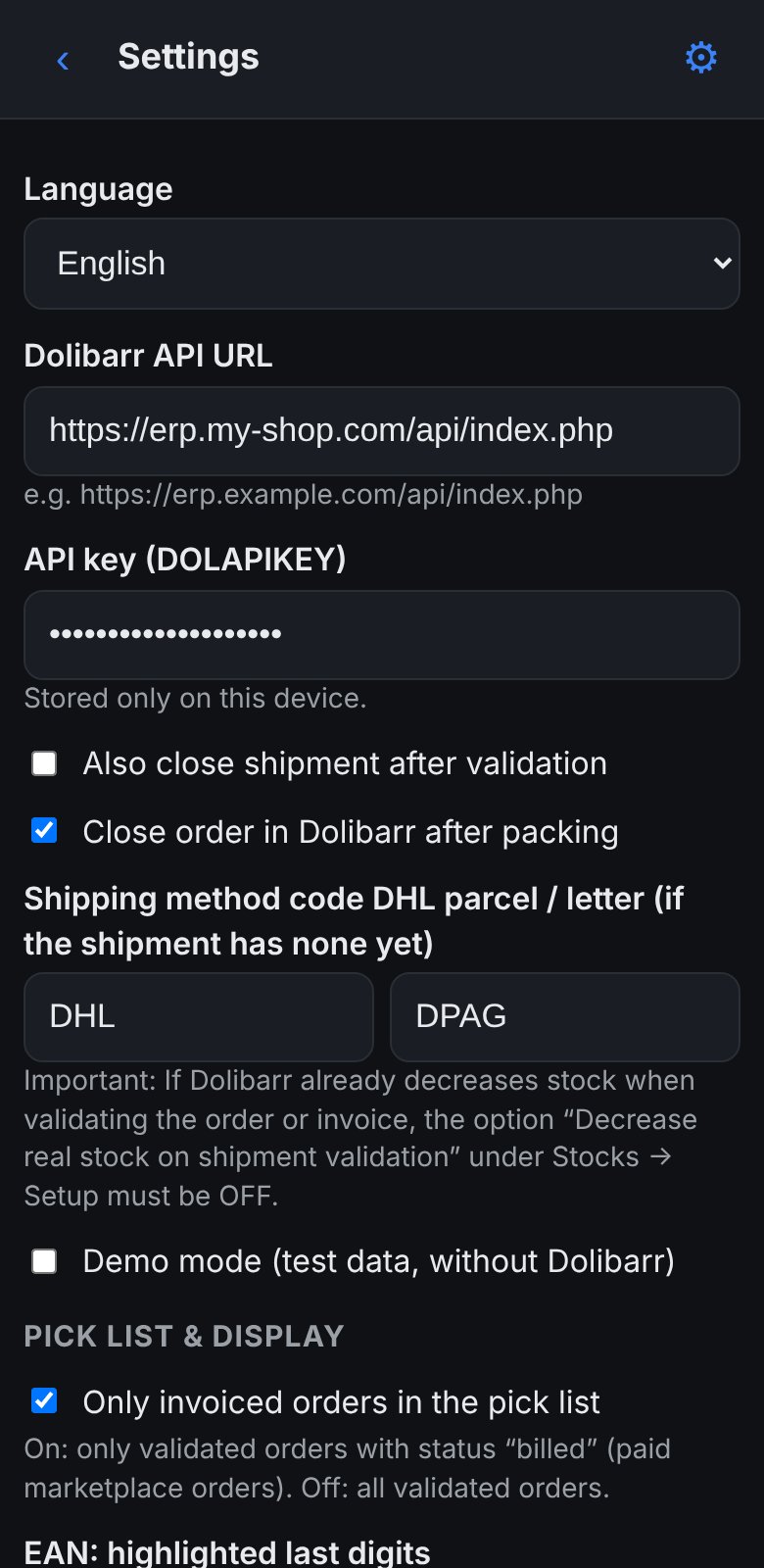
What you can configure
- Connection: Dolibarr address and API token, with connection test
- Field names: codes of the complementary attributes for storage location, GTIN, last inventory and “picked”, if you use different names
- Pick list: only invoiced or all validated orders, hidden products such as postage lines (with
*as wildcard) - Display: 4, 5 or 6 highlighted EAN digits, row 1 of the wall grid at the top or bottom
- Shipping: shipping method codes for parcel and letter, close order after packing, also close shipment
- Inventory: which warehouses are shown and in which order
- Language: automatic by browser language or fixed, 24 European languages
- Device: flashlight remembers its state, delete all settings at the push of a button
Where what is stored
| Place | What |
|---|---|
| Dolibarr | Storage location, GTIN and last inventory on the product, stock corrections as stock movements, “picked” on the order, tracking number, shipping method and status of shipment and order |
| Smartphone | API address and token, all settings, pick progress and started shipments, last assigned storage location. In the browser's local storage, only on this device. |
| Nowhere | Camera images. They are only processed on the device. |
If a device is lost, you block access by renewing the token of the API user in Dolibarr.
Frequently asked questions
What does it cost?
The apps are open source and free. You only pay if you want help: Inventory setup €249, PackScan and Inventory ready to go €490, further work €100 per hour, all net. The shipping automation is available as a separate offer.
Where is my data?
Only in your Dolibarr. The apps are HTML files on your own server. There is no cloud and no third-party service. The smartphone only holds the settings and the API token, in the browser's local storage. You delete them with one tap in the settings.
Can I test the demo with my own Dolibarr?
Often yes: switch off demo mode in the demo and enter the address and token of your Dolibarr. The connection goes directly from your smartphone to your Dolibarr. Depending on the server configuration it may be blocked from another address though. A more reliable test is the download in the customfolder of your Dolibarr. Use a read-only user for testing.
Does it run on iPhone and Android? Do I need an app store?
Both work: on iPhone in Safari from iOS 16, on Android in Chrome. No app store is needed. The apps are web apps and can be added to the home screen like a normal app.
Does scanning work in poor light?
Yes. The built-in flashlight stays on until you switch it off. The camera works in Full HD and only evaluates the area inside the frame, which makes the scan reliable even with small barcodes.
Does it work without internet in the warehouse?
Only partly. Loading lists, searching products and saving need a connection to Dolibarr. What you have already counted or packed stays saved on the device if the connection drops. Stable Wi-Fi in the warehouse is a requirement.
Do I have to create labels and Internetmarke stamps with you?
No. The apps work with any tracking number stored in the Dolibarr shipment. The automation for DHL labels, Internetmarke and feedback to eBay and other marketplaces is available as an add-on on request.
How long does the setup take?
The apps are copied in a few minutes. The bigger part is storage locations and barcodes in the products. The inventory app helps here because it suggests location by location.
Request setup
Write me briefly how many orders you ship per day, which marketplaces you use and how your warehouse is organised. I am happy to show you the apps live in my warehouse and make you an offer for the setup.
Legal notice
Information according to § 5 DDG (German Digital Services Act)
Stefan GrumpeltgRoods.de
Georginenweg 20
01169 Dresden
Germany
Contact
Phone and WhatsApp Business: +49 351 16078332Email: info@groods.de
VAT ID
VAT identification number according to § 27a German VAT Act: DE327124490
Responsible for content according to § 18 (2) MStV
Stefan Grumpelt, address as above
Consumer dispute resolution
I am neither willing nor obliged to take part in dispute resolution proceedings before a consumer arbitration board.
Liability for links
This site contains links to external third-party websites over whose content I have no influence. The respective provider or operator is responsible for this content. If I become aware of legal violations, I will remove such links immediately.
Software
PackScan and Inventory are published as open source under the GNU General Public License v3.0 or later. The software is provided without warranty to the extent permitted by law. For the paid setup package, the terms agreed in the respective offer apply.
Privacy policy
This policy applies to this website. It explains which personal data is processed when you visit and when you contact me. The apps PackScan and Inventory themselves are used in your own business and explained there (see below). This is a translation, the German version is legally binding.
1. Controller
Stefan Grumpelt, gRoods.deGeorginenweg 20, 01169 Dresden, Germany
Email: info@groods.de
Phone: +49 351 16078332
No data protection officer has been appointed, as there is no legal obligation to do so.
2. Hosting and server log files
This website is hosted by netcup GmbH, Daimlerstraße 25, 76185 Karlsruhe, Germany. When the page is accessed, the server automatically processes data that your browser transmits: IP address, date and time of access, requested file, amount of data transferred, referrer URL, browser type and operating system. This is technically necessary to deliver the page and keep operation secure.
The legal basis is Art. 6 (1) (f) GDPR. My legitimate interest lies in the stable and secure provision of the website. The log files are deleted after 14 days at the latest, unless they are needed longer to investigate a security incident. A data processing agreement according to Art. 28 GDPR is in place with the host.
3. No cookies, audience measurement with Matomo
This website sets no cookies, uses no advertising services and embeds no social media plugins. Fonts and images are loaded from my own server, no data is passed to third parties such as Google.
To see which content is read, I use the open-source software Matomo. It runs on my own server at netcup, without cookies and without recognising you across several days. It records the IP address shortened by two bytes, the pages viewed, date and time, referrer URL, browser, operating system, screen size and language, as well as clicks on downloads and links to other sites. This does not allow me to identify you. The data is not passed on to third parties.
The legal basis is Art. 6(1)(f) GDPR. My legitimate interest is improving the site. Raw data is deleted after six months, after that only aggregated figures remain. If “Do Not Track” is enabled in your browser, nothing is recorded. Turn off tracking on this device
If you choose a language with the flags or turn off tracking, your browser remembers this locally. Nothing is transmitted. The “Copy” button only places the contact details in your device's clipboard.
4. Contact by email or phone
If you write to me or call me, I process your details (e.g. name, email address, phone number, content of the request) to answer the request and to make an offer if applicable. The legal basis is Art. 6 (1) (b) GDPR if the request aims at a contract, otherwise Art. 6 (1) (f) GDPR (legitimate interest in answering).
The data is deleted as soon as the request has been dealt with and no statutory retention obligations prevent this. Commercial and tax documents such as accepted offers or invoices are kept for 6 or 10 years according to § 257 HGB and § 147 AO.
5. Contact via WhatsApp Business
You can also reach me via WhatsApp Business. The “Open chat” link leads to WhatsApp (wa.me). A connection to WhatsApp is only established when you click it. The provider is WhatsApp Ireland Limited, Merrion Road, Dublin 4, D04 X2K5, Ireland.
When used, WhatsApp processes your phone number, communication metadata (e.g. time, device) and possibly other data under its own responsibility. Data may be transferred to Meta Platforms Inc. in the USA. Meta is certified under the EU-US Data Privacy Framework. Message contents are end-to-end encrypted.
The legal basis for my processing is Art. 6 (1) (b) or (f) GDPR. Use is voluntary. If you do not want this, please write to me by email. More in the WhatsApp privacy information.
6. Support via PayPal
The “Support with PayPal” button is a simple link. You are only forwarded to PayPal when you click it. The provider is PayPal (Europe) S.à r.l. et Cie, S.C.A., 22-24 Boulevard Royal, L-2449 Luxembourg. PayPal processes the payment data under its own responsibility. I receive name, email address and amount to book the payment. The legal basis is Art. 6 (1) (b) GDPR, retention follows § 147 AO. More in the PayPal privacy statement.
7. Note on the apps and the online demo
The apps run in your browser and connect directly to your own Dolibarr installation. I receive no data. Server address, API key and settings are only stored on your device. The camera is only used for scanning on the device; images are neither transmitted nor stored. You are responsible for processing customer and order data in your Dolibarr.
The same applies to the online demo at groods.de/demo/: accessing it only creates the server log files described in section 2. If you enter your own Dolibarr there, address, token and settings remain in your browser's local storage. The connection goes directly from your device to your Dolibarr; I receive nothing.
If I get access to your Dolibarr as part of the setup package, we conclude a data processing agreement according to Art. 28 GDPR if required.
8. Your rights
You have the right to:
- access to your stored data (Art. 15 GDPR)
- rectification of incorrect data (Art. 16 GDPR)
- erasure (Art. 17 GDPR)
- restriction of processing (Art. 18 GDPR)
- data portability (Art. 20 GDPR)
- object to processing based on Art. 6 (1) (f) GDPR on grounds relating to your particular situation (Art. 21 GDPR)
An informal message to info@groods.de is sufficient.
You can also lodge a complaint with a data protection supervisory authority. Responsible for me is the Saxon Data Protection and Transparency Commissioner, Devrientstraße 5, 01067 Dresden, Germany.
9. Last updated
October 2026. I will update this policy when the website or the legal situation changes.